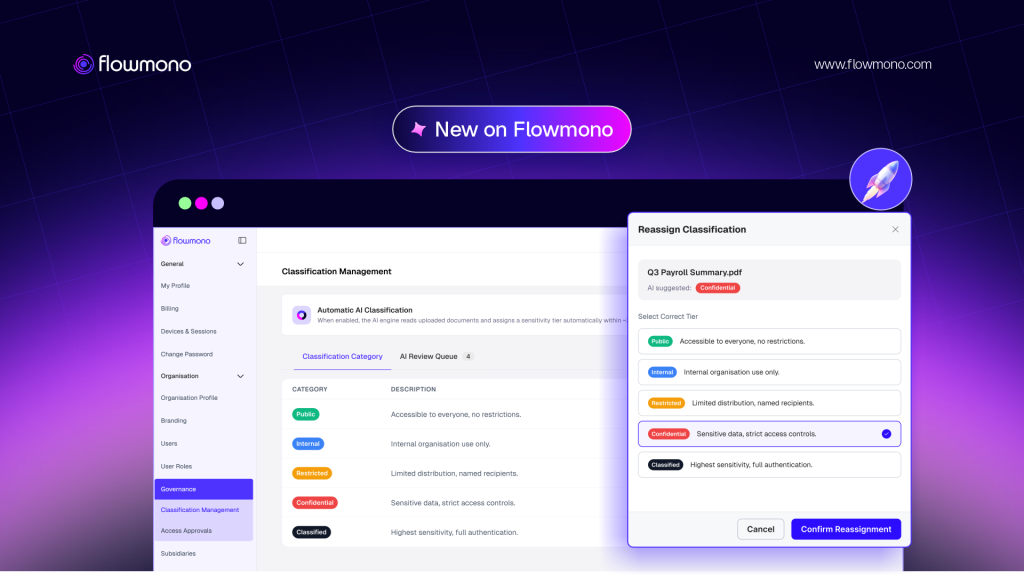
Most organisations have a document sensitivity policy. Very few have a system that enforces it automatically, at the document level, across every workflow event. That gap closes today.
Ask any compliance officer whether their organisation has a document sensitivity policy and the answer is almost always yes. The policy exists. It defines which documents are confidential, which are for internal use only, which can be shared externally and under what conditions.
Then ask them how that policy is enforced at the document level, in practice, for every document that moves through the organisation today. The answer changes. The policy is applied inconsistently, by individuals who may or may not remember the classification requirements, in the moment of sending, uploading, or sharing a document, under time pressure, without an automated system checking whether the action complies with the policy that governs it.
The consequence of that gap is quantified in the research. The 2026 Ponemon Institute Cost of Insider Risks Global Report, published with DTEX, found that the average annual cost of insider risk reached 19.5 million dollars per organisation in 2025, a 12 percent increase from the prior year. Critically, 53 percent of incidents were caused by negligent insiders, not malicious ones. Documents shared with the wrong person, downloaded by someone without authorisation, or accessed by a party whose permissions were never formally verified. The policy existed. The enforcement did not.
| $19.5M | Average annual cost of insider risk per organisation in 2025, with 53% of incidents caused by negligent employees sharing or accessing documents outside their permitted scope Ponemon Institute and DTEX, 2026 Cost of Insider Risks Global Report |
The regulatory pressure amplifying this risk is expanding rapidly. According to IAPP’s global 2026 data protection update, cited by Snowflake’s governance research, 179 of 240 analysed jurisdictions now have data protection frameworks in place, each imposing specific obligations on how organisations classify, handle, and protect sensitive data. GDPR alone carries maximum penalties of 20 million euros or 4 percent of global annual turnover. The Nigeria Data Protection Act, the UK GDPR, Brazil’s LGPD, and India’s DPDP Act follow similar penalty structures. The organisations operating across borders are managing a regulatory environment that expects not just a classification policy but demonstrable, automated enforcement of that policy at the point of every document interaction.
What Flowmono Document Classification and Governance Does
Flowmono Document Classification and Governance is a feature within the Flowmono platform that enables organisations to classify documents based on their sensitivity and enforce security and access policies automatically throughout the document lifecycle.
It is not a standalone compliance tool. It is not a separate access management system. It is a governance layer that operates inside the same platform where documents are already being created, converted, signed, approved, and archived, applying classification rules at the moment documents enter the system and enforcing them at every subsequent interaction.
The distinction that matters is automatic enforcement. A policy document tells people what to do. Flowmono Document Classification and Governance changes what the system will allow, based on the classification assigned to every document in the platform.
The Five Classification Labels and What Each One Enforces
The system operates through five classification labels that correspond to standard enterprise document sensitivity tiers. Each label carries a configured set of governance rules that the system enforces automatically when a document is assigned that classification.
| Classification Label | Who Can Access | Governance Enforcement |
| Public | Anyone, including external parties without authentication | No access restrictions, public sharing permitted, View and Download permission level |
| Internal | Internal users only | External access blocked, no public sharing, authentication may be required depending on configuration |
| Restricted | Specific internal users or defined groups | Access limited to named or role-based internal users, View Only or View and Download as configured, authentication required |
| Confidential | Authorised internal users only, with authentication | External access requires administrator-approved access request, authentication required for all access, View Only default, administrator controls sharing |
| Classified | Highest sensitivity: specific named individuals only | No external access, authentication required, View Only, all access events logged, administrator approval required for any access request |
These labels are not cosmetic. When a document is classified as Confidential, the system does not display a label and rely on users to respect it. It automatically enforces the access controls, permission levels, and authentication requirements configured for that classification tier. A user without authorisation who attempts to open the document is blocked and may submit an access request, which routes to an administrator for review.
How It Works: The Five-Stage Flow
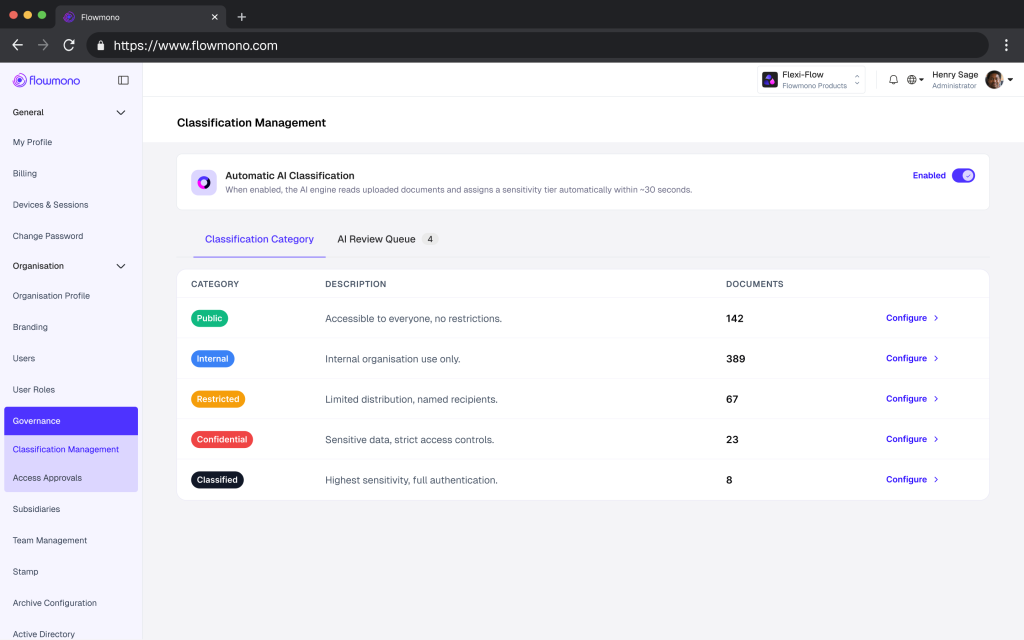
1. Administrator configures classification settings
The Organisation Administrator sets the classification policy inside Flowmono. The administrator selects whether documents should be classified automatically by AI or manually by users. They choose which products the policy applies to: Signing Requests, Flowmono Drive, or both. They configure the governance rules for each classification label, defining who can access documents at each tier, what permission level applies (View Only or View and Download), whether authentication is required before access, and whether public sharing is permitted.
2. Classification is applied at the point of upload
When a document enters Flowmono, classification is applied in one of two ways. If AI-assisted classification is configured, the system analyses the document’s content and assigns the appropriate classification label automatically, based on what it reads. A loan agreement containing personal financial data and confidentiality terms is classified as Confidential. A board resolution containing strategic undisclosed information is classified as Classified. If manual classification is configured, the user selects the appropriate label during upload. Both methods can be used within the same organisation, with administrators choosing the approach that fits the document type and workflow.
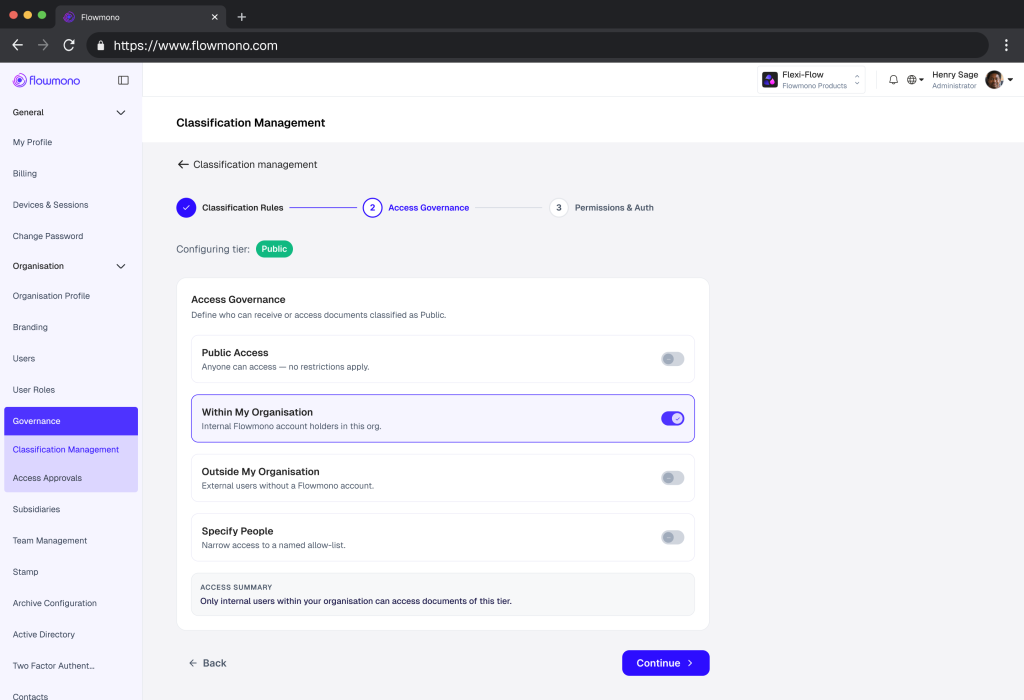
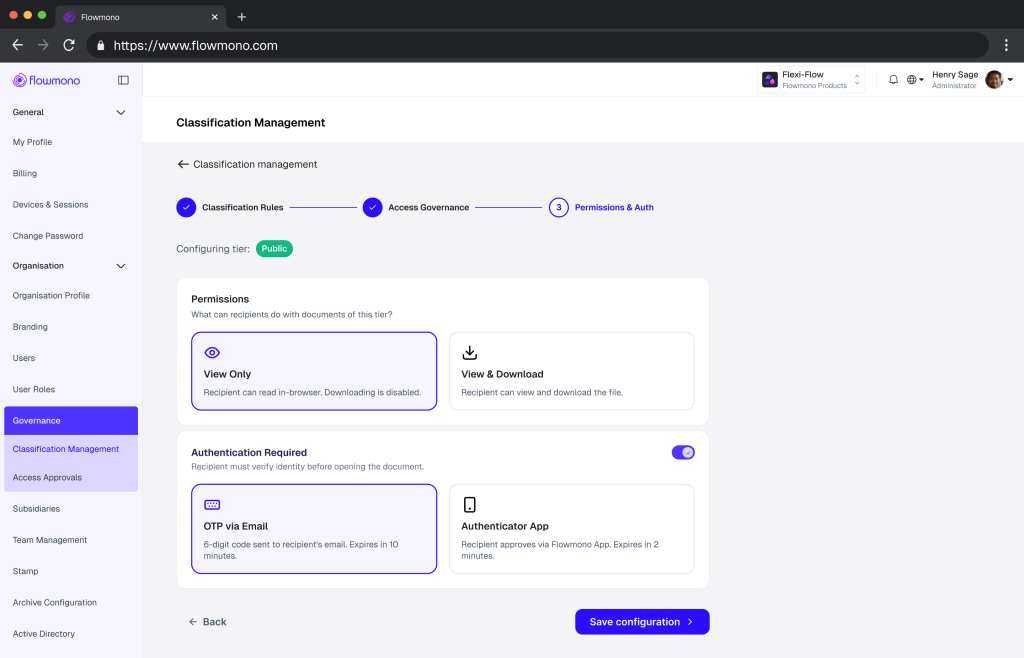
3. Governance policies are enforced automatically
The moment a classification is assigned, the system applies every governance rule configured for that label. No administrator action is required at the individual document level. The access controls activate. The authentication requirements apply. The sharing restrictions engage. The permission level is set. If the document is Restricted, external users are automatically blocked from access. If it is Confidential, the system requires authentication before any authorised user can open it. If it is Classified, only the specific named individuals in the configuration can access it, and every attempt, successful or otherwise, is logged.
4. Access requests are managed within the platform
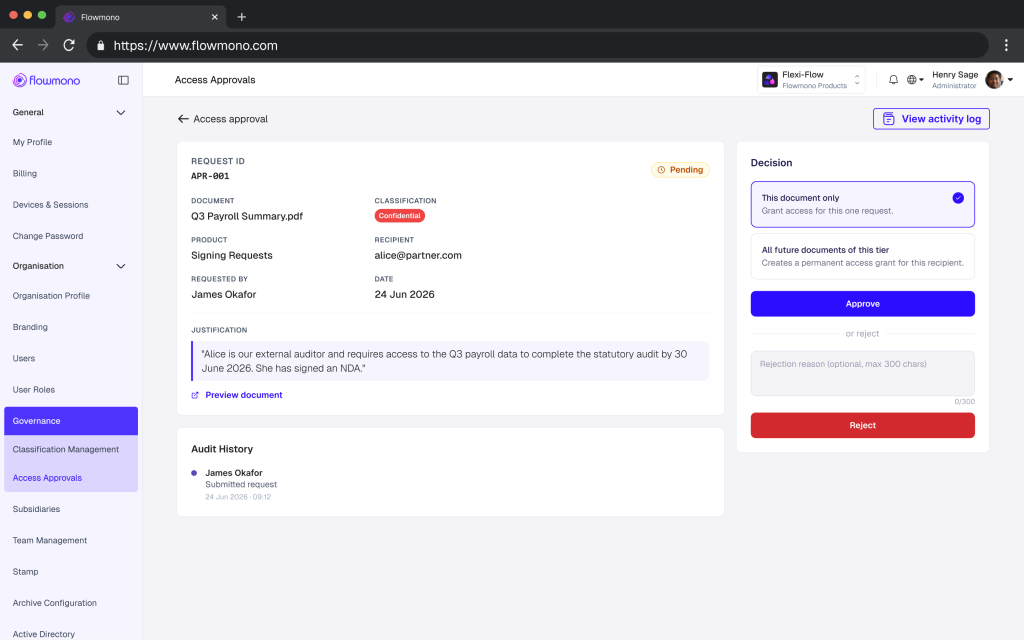
When a user without permission needs access to a restricted document, they submit an access request through Flowmono. The administrator receives the request and reviews it. They can approve or reject it. Approval can be granted for a single document or for all future documents within the same classification tier. The entire access request lifecycle is recorded in the audit trail: the request, the reviewer, the decision, and the scope of the approval.
5. Every event is captured in the audit trail
All classification decisions, including AI-assisted and manual, all access requests, all approval and rejection decisions, all sharing activities, and all document interactions are recorded automatically in Flowmono’s tamper-evident audit trail. The audit record is created at the moment of each event, not reconstructed after the fact. For any document in the system, the classification history, the access record, and the complete governance log are available without manual assembly.
The Example That Illustrates the Full Flow
Banking: Customer Loan Agreement
A financial institution configures Flowmono to automatically classify customer loan agreements as Confidential. When a loan agreement is uploaded by a relationship manager, the AI reads the document, identifies the personal financial data and contractual confidentiality terms, and assigns the Confidential classification automatically. The system immediately applies the configured governance rules: access is restricted to authorised internal users, authentication is required before the document can be opened, and external sharing is blocked by default. An external auditor conducting a regulatory review submits an access request for a specific loan agreement through Flowmono. The administrator reviews the request, verifies the auditor’s credentials and the scope of the review, and approves access for that specific document. The auditor can view the document but cannot download it, because the permission level for Confidential documents is set to View Only for external access. Every step of this sequence is recorded in the audit trail: the upload, the AI classification decision, the auditor’s access request, the administrator’s approval, and the auditor’s document view event.
Why This Matters Now
The Konfirmity ISO 27001 Data Classification Guide published in January 2026 frames the operational reality precisely: most enterprise buyers now request assurance artefacts before they sign a contract. They look for evidence that a provider can protect their data, not just promises. Yet many organisations treat classification as an afterthought. They stand up policies on paper, but when an auditor asks where sensitive data lives, how it is labelled, and who can access it, they scramble.
The scramble has a cost. Organisations leveraging automated data classification systems reduce compliance violations by 73 percent and avoid average penalties exceeding 4.2 million dollars per incident, according to 2026 automated classification research from Artsyl Technologies. The reduction is not because their data is less sensitive. It is because the classification is enforced automatically, consistently, at the document level, rather than being delegated to individuals who may or may not apply the policy correctly in the moment of a specific action.
| 73% | Reduction in compliance violations for organisations using automated document classification, compared to those relying on manual policy application Artsyl Technologies, 2026 Data Classification Research |
As Kiteworks’ data governance research for file sharing environments articulates it: you cannot protect what you have not classified. That principle sits at the foundation of every mature data protection programme and it is now embedded in regulatory requirements that apply directly to regulated file sharing environments. GDPR’s data minimisation principle, NIS 2’s obligation to implement appropriate security measures for categorised data, and DORA’s ICT risk management framework all presuppose that organisations know what data they hold, how sensitive it is, who has touched it, and under what conditions it can flow.
The operational gap between a classification policy that exists on paper and classification governance that is enforced automatically at the document level is where most regulatory exposure originates. Flowmono Document Classification and Governance closes that gap at the platform level, not through additional policy overhead, but through automated enforcement that runs every time a document is created, uploaded, accessed, or shared.
What This Changes for Each Function in Your Organisation
1. For Compliance Officers
Document classification governance is no longer a manual review process or a periodic audit exercise. Every document in Flowmono is classified at the point of entry. Every access event is recorded in real time. Every governance decision, including access approvals and rejections, is captured in a tamper-evident trail that can be produced for a regulatory examination without reconstruction. The compliance function gains continuous, automatic evidence of governance in practice rather than governance in policy.
2. For IT and Security Leaders
The access control layer for sensitive documents no longer depends on individual user behaviour or the correct application of sharing settings by the person handling the document. Classification-based governance enforces access controls automatically, based on the document’s sensitivity tier, regardless of who is handling it or what they intended to do with it. The security posture of the document estate improves structurally, not behaviourally.
3. For Legal and Operations Teams
Confidential legal documents, NDAs, settlement agreements, and regulatory submissions are protected by the same classification governance as every other document in the platform. An NDA classified as Confidential cannot be forwarded to an external party without that access being blocked, requested, reviewed, and approved. The legal team’s document governance responsibility shifts from monitoring and correcting to configuring and verifying.
4. For Finance and Procurement
Board papers, budget documents, capital expenditure authorisations, and vendor contracts classified at the appropriate sensitivity tier are protected from the moment they are uploaded. A Restricted budget document cannot be accessed by a team member outside the configured authorisation group, even if the link is shared. The finance function gains enforceable document access governance without adding manual overhead to every document handling event.
AI-Assisted or Manual: Choosing the Right Approach
Flowmono Document Classification and Governance supports both AI-assisted and manual classification, with administrators choosing the approach that fits their governance policy and workflow requirements.
AI-assisted classification is the right choice for high-volume environments where documents are uploaded frequently and the manual classification step would create friction or be inconsistently applied. The AI reads the document content and assigns the label based on what it finds. This is appropriate for standardised document types, such as loan agreements, invoice batches, and HR contracts, where the classification is predictable from the content.
Manual classification is the right choice for environments where document sensitivity is not always determinable from content alone, where strategic or contextual factors influence the classification decision, or where regulatory requirements mandate human accountability for the classification decision. The two approaches can coexist within the same organisation, with AI handling high-volume standard documents and manual classification applied to the strategic and contextual cases where human judgement is appropriate.
The governance outcome is the same regardless of which classification method is used. Once a classification is assigned, the enforcement is automatic. The method of classification determines how the label is assigned. The system determines what happens next.
The Audit Trail: Governance That Proves Itself
One of the most practically valuable elements of Flowmono Document Classification and Governance is what it produces as a by-product of normal operation: a complete, tamper-evident record of every governance event in the document lifecycle.
Classification decision. Access request submission. Access review and decision. Permission level applied. Document view event. Sharing activity. Reclassification event. Each of these is recorded at the moment it occurs, with the identity of the relevant party, the timestamp, and the document version. The record is stored separately from the document in a tamper-evident structure, meaning any post-event modification is detectable.
For a regulatory examination, a legal dispute, or an internal investigation, this record answers every governance question without reconstruction: who classified this document, when, and how; who accessed it, when, and under what permission level; who was denied access; who requested access and who approved or rejected that request.
This is the audit trail that compliance frameworks are increasingly demanding. As noted in our previous analysis of what automated audit trails provide versus manual record-keeping, the distinction is not between a complete record and an incomplete one. It is between a record that was created automatically at the moment of each event and one that must be reconstructed from memory and email history when the question is asked. The first is governance. The second is recovery.
Getting Started Today
Flowmono Document Classification and Governance is available on the platform today. Organisation Administrators can configure the feature by navigating to classification settings in the administration panel, selecting the classification approach (AI-assisted or manual), applying the policy to the relevant products (Signing Requests, Flowmono Drive, or both), and configuring the governance rules for each classification label.
The feature works alongside every existing Flowmono capability. Documents already in signing workflows can be classified at the point of upload. Documents stored in Flowmono Drive are governed by the classification rules from the moment the policy is configured. Existing audit trail records remain intact and the classification governance audit events are added to the same trail, creating a unified governance record across all document interactions on the platform.
For more on how Flowmono’s AI capabilities work at the document level, read our guide to AI Co-Signing and how document intelligence operates in signing workflows. For the broader context of how intelligent workflow execution connects document governance to operational outcomes, see our article on the next evolution of workflow automation.
Flowmono Document Classification and Governance is available now. Configure your organisation’s classification policy on Flowmono today and ensure that every sensitive document in your platform is governed automatically, from the moment it enters the system to the moment it is archived.
